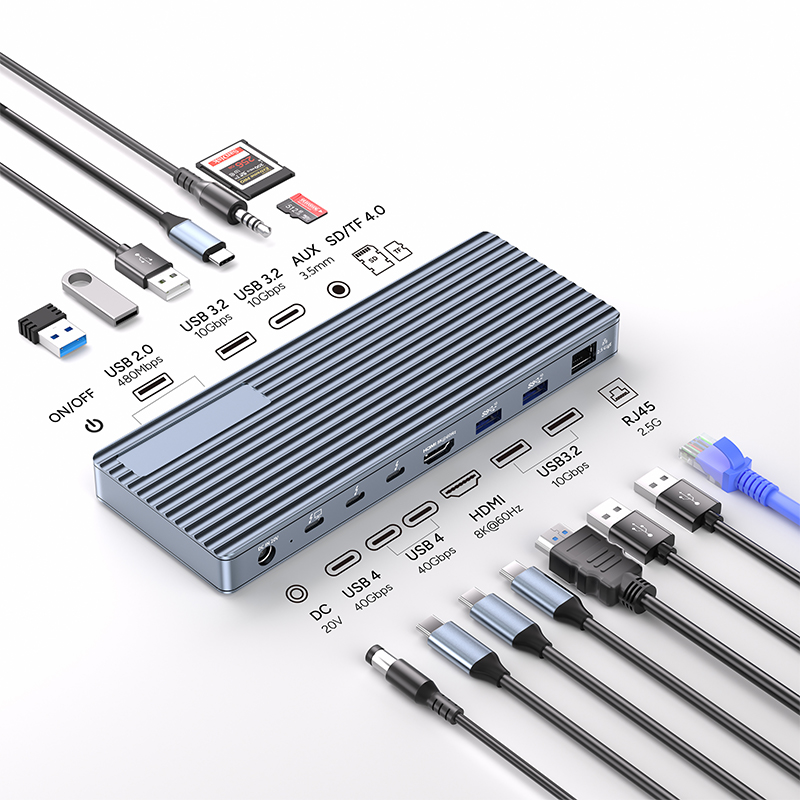
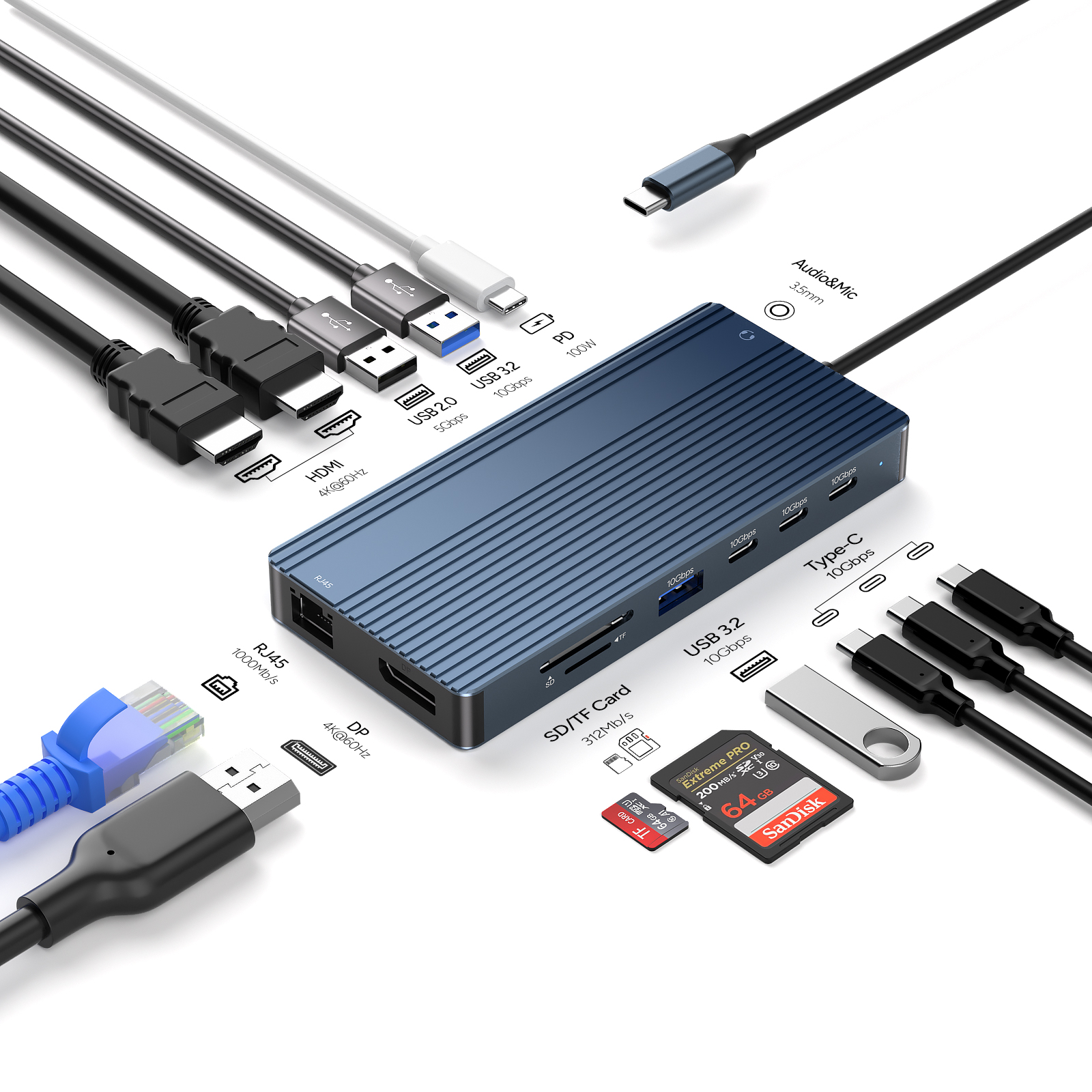
USB-C docks have surged in popularity due to their versatility and convenience. These compact devices expand connectivity options for laptops, tablets, and smartphones, offering multiple ports such as HDMI, USB-A, RJ45 Ethernet, and SD/Micro SD card readers.
As more devices adopt the USB-C standard, docks enable easy access to peripherals and external displays, enhancing productivity for professionals and gamers alike. Their sleek design and universal compatibility make them essential accessories for modern tech users. With the ability to charge devices while connecting multiple peripherals, USB-C docks streamline workflows and simplify setups, catering to the needs of today’s mobile and remote lifestyles.
While USB-C docks enhance connectivity, they also pose security risks. Malicious devices can exploit vulnerabilities, potentially leading to data breaches or unauthorized access. Ensuring that docks come from reputable manufacturers and using security features like encryption is crucial. Additionally, users should be cautious about connecting to unknown or public USB-C docks. Despite these risks, the importance of USB-C docks cannot be overstated; they facilitate efficient workflows and device management, making them essential tools in today’s tech-driven environment.
Why You Should Be Concerned About USB-C Dock Security
Potential Damage to Devices
Overheating in USB-C docks can lead to severe damage to connected devices. Excessive heat can harm internal components, potentially resulting in malfunctions or complete failure. For instance, prolonged exposure to high temperatures can degrade battery life, affect performance, and even lead to physical damage like warped casings.
Data Loss Concerns
Heat can also jeopardize data integrity. Devices may experience crashes or file corruption when overheated, leading to potential data loss. For example, if a laptop connected to an overheating dock abruptly shuts down, unsaved work or critical files could be lost.
Unauthorized Access
Some docks may allow unauthorized users to connect devices. For example, if you're in a public space and someone plugs in a rogue device, it could gain access to your system.
Malware Infections
Malware can be delivered through USB-C docks. A seemingly harmless dock could install harmful software on your device, leading to data loss or theft.
Useful Practices
To avoid the harm caused by improper use of a USB-C dock, it is necessary to take some measures:
Choose Reliable Brands and Models
When selecting a USB-C dock, it’s essential to opt for products from reputable manufacturers known for their commitment to quality and safety standards. Researching reviews and ratings can help identify models with a proven track record of reliability and performance. Consider checking for certifications that indicate compliance with safety regulations, as this can further ensure a dependable choice.
Let me introduce the powerful functionality, practicality, and durability of the PURPLELEC Thunderbolt™ Docking Station as an example:
This Thunderbolt dock boasts massive expansion capability, equipped with 11 professional-grade ports designed to achieve a leap in productivity:
Extreme Thunderbolt™ 40Gbps: Features 2 x Type-C Thunderbolt/USB4 ports, supporting ultra-high transfer rates up to 40Gbps, and is backward compatible with USB 3.2/3.1/3.0/2.0 standards.
Triple 4K Visual Feast: Supports up to three display outputs: a single screen up to 8K@30, or dual screens at 4K@60Hz, or triple screens at 4K@30Hz, providing stunning visuals via HDMI and Type-C video outputs.
Robust Power Delivery: DC 20V power input provides up to 85W PD power to the host device, while the Type-C ports offer up to 15W power output.
High-Speed Data Transfer: Includes 3 x USB-A 3.2 Gen2 ports supporting a maximum of 10Gbps data transmission, and 2 x USB-A 2.0 ports (480Mbps) for various peripherals.
Stable Gigabit Network: RJ45 Gigabit Ethernet port (10M/100M/1000M) provides a stable and blazing-fast wired connection.
Efficient Card Reading: Dedicated SD 3.0 and TF/Micro SD 3.0 card readers with transfer speeds up to 104Mb/s.
Audio Connectivity: Includes a 3.5mm Audio (Audio & Mic) interface, meeting professional audio needs.
Avoid Long Hours of Continuous Use
Prolonged use of USB-C docks can lead to overheating, which poses risks to both the dock and connected devices. To mitigate this risk, try to limit the duration of continuous use. Taking regular breaks allows the dock to cool down, reducing the likelihood of damage from excessive heat. If you notice the dock becoming excessively warm, it’s wise to disconnect devices and allow it to rest.
Maintain Good Ventilation
Proper ventilation is critical for the safe operation of USB-C docks. Ensure that the dock is placed in an open area with adequate airflow. Avoid covering the dock with fabrics or placing it in confined spaces, as this can trap heat and significantly increase the risk of overheating.
Regular Cleaning
Dust and debris can accumulate in the dock’s ports and vents, obstructing airflow and contributing to overheating. Regularly clean the dock using compressed air to remove any buildup. This simple maintenance task helps maintain optimal airflow and prevents overheating issues.
The Significance of Safe Use of USB-C Docks

Protecting Devices
Safe use of USB-C docks is crucial for protecting connected devices. Overheating or improper handling can lead to hardware damage, impacting performance and lifespan. By using reliable docks and avoiding prolonged use, users can prevent costly repairs or replacements.
Data Integrity
Maintaining safety in USB-C dock usage also safeguards data integrity. Overheating or power surges can result in data corruption or loss, jeopardizing important files and projects. Ensuring a stable connection and avoiding excessive heat helps preserve valuable information.
Enhancing User Experience
A well-maintained USB-C dock enhances the overall user experience. By ensuring proper ventilation, regular cleaning, and selecting quality brands, users can enjoy seamless connectivity without interruptions. This reliability fosters productivity, whether for work or leisure.
Promoting Longevity
Finally, safe practices contribute to the longevity of USB-C docks themselves. By treating equipment with care, users can extend its lifespan, maximizing their investment and minimizing waste. Prioritizing safety in usage ultimately leads to a more efficient and sustainable technology environment.
Conclusion
We have discussed the importance of the secure use of USB-C Docks. Clearly, you can choose reliable brands, limit continuous use, ensure good ventilation, and perform regular cleaning to enjoy safer use of your USB-C dock.
By adhering to these safe use recommendations, you can significantly enhance the security of your devices and data. This proactive approach minimizes the risks of damage and data loss, fostering a more reliable user experience.