Precise Definition and Features of USB Docking Stations
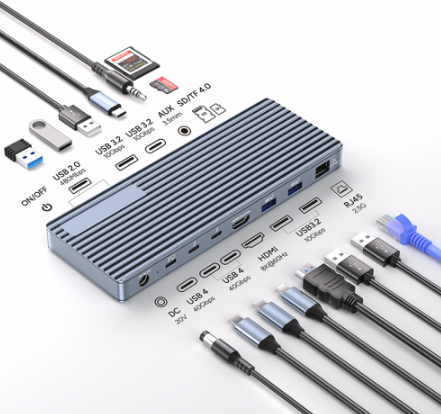
A USB-C Docking Station (also known as a Port Replicator) serves as an expansion adapter for USB-C devices, enhancing connectivity by linking multiple peripherals to a laptop. Its compact design and mini size make it ideal for mobile office scenarios. This type of dock typically includes additional USB-A ports (compatible with most PC peripherals), while premium models integrate SD/Micro SD card slots, HDMI, DisplayPort, VGA, and Gigabit Ethernet ports, further boosting flexibility.
Technical Principles and Performance of USB Docking Stations
The device connects to a laptop via a single cable, offering multi-interface configurations including USB-A, USB-C, SD/Micro SD card slots, HDMI, DisplayPort, VGA, and Gigabit Ethernet. Note: It only provides basic power support for small peripherals like headphones or USB drives, requiring an additional charger. Transmission performance depends on dock specifications—USB 2.0 supports up to 480Mbps, USB 3.0 reaches 5Gbps (suitable for large file transfers), and USB 3.1 offers 10Gbps (20x faster than USB 2.0). As USB docks lack independent video output, users still rely on the laptop’s built-in screen.
Functional Positioning and Scenario Advantages of Docking StationsDocking Stations (Port Replicators) act as premium connectivity solutions for laptops or desktops, enabling a qualitative leap in efficiency through interface expansion. Connected via a single USB-C or Thunderbolt cable, they provide missing ports/functions, allowing easy connection to displays, keyboards, mice, phones, and USB drives. Typically integrating USB ports, HDMI, DisplayPort, VGA, audio interfaces, Ethernet ports, and PD charging ports, they optimize desktop layouts for multi-device workstations.
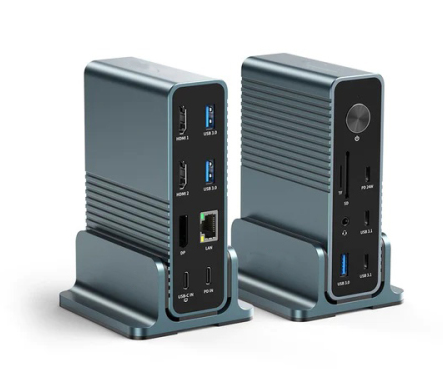 Technical Architecture and Performance Parameters of Docking StationsDocking Stations connect via a single cable, offering USB-A, USB-C, Thunderbolt, and other interfaces. Supporting Thunderbolt 4, USB4, and USB-C protocols, they enable multi-format ultra-HD display outputs (e.g., 4K/5K/8K) for professional design needs. Compatibility checks with laptop ports/OS are essential. With Thunderbolt 3/4 and USB4/3 interfaces, data speeds reach 40Gbps, backward compatible with USB 3.1 (10Gbps) and USB 3.0 (5Gbps). Built-in power modules provide 65W–150W charging, rivaling original chargers.
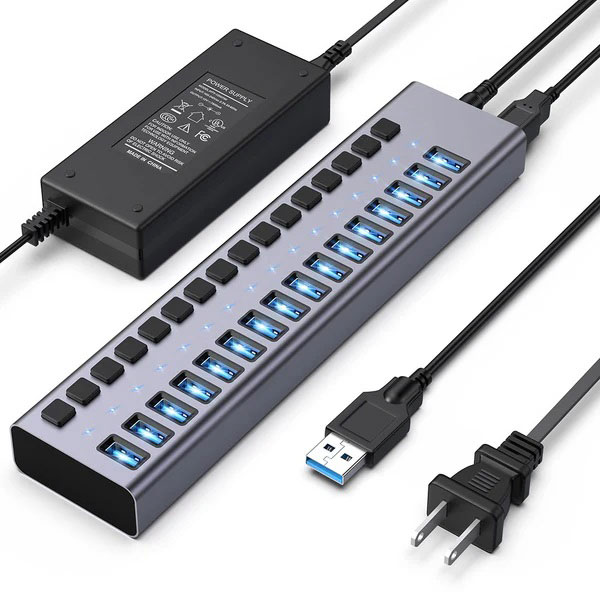 Core Differences Between USB Hubs and Docking StationsThe distinction between USB-C Hubs and Docking Stations is subtle. Both expand peripheral connections. USB-C Hubs primarily increase USB-A ports, powered by the laptop, with compact, portable designs ideal for frequent travelers. Docking Stations sacrifice some mobility for comprehensive interface expansion (video ports, Ethernet, audio, card readers, multi-USB ports) and require external power. They support simultaneous device/laptop charging, often needing a power outlet.
Benchmark Recommendation—PURPLELEC 15-in-1 Docking Station
The PURPLELEC 15-in-1 Docking Station is a full-featured solution supporting single 8K/triple 4K display output, ensuring high-resolution visuals. It features high-speed data transfer, 1000Mbps Ethernet, 100W PD charging, and integrated security locks. Its compact design packs 15 interfaces into minimal space, balancing functionality and protection.
ConclusionChoose between USB Hubs and Docking Stations based on specific needs. USB Hubs offer strong portability, while Docking Stations build multi-functional work centers with robust power support. For high-resolution and portable office scenarios, the PURPLELEC 15-in-1 Docking Station is the optimal choice. 
 Technical Architecture and Performance Parameters of Docking Stations
 Core Differences Between USB Hubs and Docking Stations








