Developed jointly by Intel and Apple, the Thunderbolt interface has become a high-performance solution for connecting external devices to computers. This technology was first introduced under the name "Light Peak" and officially entered the consumer electronics market in 2011.
The core of this technology lies in integrating PCI Express and DisplayPort signals into a serial data stream, enabling simultaneous data and power transmission through a single cable. This innovative design requires both the end device and the host to be equipped with dedicated control chips. Intel has introduced single-port and dual-port controller solutions for this purpose.
During operation, the controller multiplexes the data streams of PCIe and DisplayPort devices. These streams are transmitted via bidirectional Thunderbolt channels and demultiplexed at the receiving end. When the host is equipped with a DisplayPort signal source, most Thunderbolt devices can directly function as display terminals. Notably, a single Thunderbolt port supports connecting up to six devices via daisy-chaining or a hub.
Interestingly, this technology was initially developed based on an optical fiber transmission solution. However, subsequent testing revealed that copper cables could not only achieve a single-channel rate of 10Gbps at a lower cost but also facilitated perfect integration with the Mini DisplayPort interface. After Apple licensed the "Thunderbolt" trademark to Intel, the technology was officially named.
Features of First and Second Generation Technology
Both Thunderbolt 1 and 2 adopt the Mini DisplayPort physical interface design.
Thunderbolt 1 offered a 10Gbps transfer rate, significantly surpassing USB interface performance at the time.
Launched in 2013, Thunderbolt 2 utilized channel bonding to combine two 10Gbps channels, achieving a total bandwidth of 20Gbps. This generation also enhanced video output capabilities, supporting a single 4K display or two QHD displays, while maintaining full backward compatibility.
Third-Generation Technological Revolution
Thunderbolt 3 marked a significant shift in the technological roadmap, switching to the USB-C interface and natively supporting USB devices.
It achieved a leap in performance, reaching a bandwidth of 40Gbps. It supports up to four PCIe 3.0 data transfer channels. For video output, it mandates support for the DisplayPort 1.2 standard and optionally supports DisplayPort 1.4.
Note: To ensure performance over longer distances (exceeding 0.5 meters), the use of special active cables is recommended.
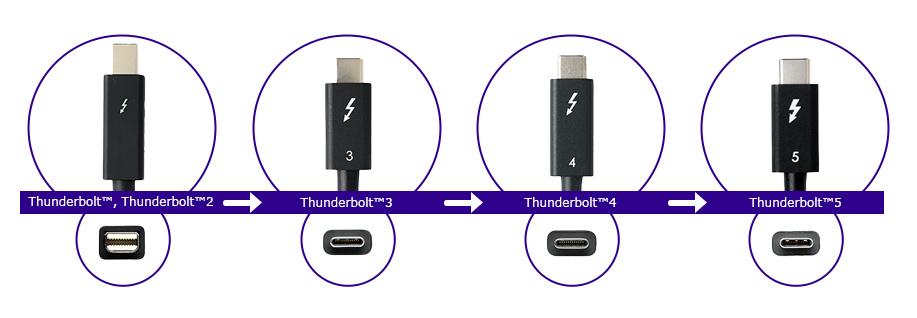
Fourth-Generation Technological Advancement
Released in 2020, Thunderbolt 4 builds upon the high performance of its predecessor, with a focus on enhancing feature completeness, security standards, and reliability.
Key improvements include:
Display Output: Mandatory support for dual 4K or single 8K display output.
Data Transfer: Increased the mini-mum PCIe transfer requirement to 32Gbps.
Security: Added Direct Memory Access (DMA) protection based on Intel VT-d, effectively guarding against physical DMA attacks.
Connectivity Expansion: Support for USB hubs using Thunderbolt Alternate Mode.
Bandwidth Configuration: Maintains a total bandwidth of 40Gbps, consistent with Thunderbolt 3.
Core Value of Thunderbolt 4
Versatile Connectivity: A single interface integrates 40Gbps data transfer, video output, and up to 100W power delivery, realizing "one cable connects all."
Expansion Capability: Supports daisy-chaining of up to six devices and can drive multiple high-resolution displays, effectively simplifying workstation cabling.
Wide Compatibility: Fully compatible with Thunderbolt 3, USB4, and USB-C devices, utilizing the reversible USB-C interface design.
Enhanced Security: Hardware-level DMA protection reinforces system security.
Intelligent Experience: When connected via a dock, it supports waking the computer from sleep mode using peripherals.

Cable Selection Guide
When selecting a Thunderbolt cable, consider the following factors:
Needs Assessment: Determine the required video specifications and transfer rate based on actual usage scenarios, especially display requirements.
Quality Certification: Prioritize certified high-quality cables to avoid performance loss or device damage that can occur with uncertified products.
Future-Proofing: Even if current devices cannot fully utilize Thunderbolt 4's capabilities, investing in a high-quality cable ensures it meets needs for years to come.
By comprehensively evaluating key factors such as compatibility, performance parameters, cable length, and power delivery capability, you can select the most suitable Thunderbolt cable, significantly enhancing work efficiency and your digital life experience.