I. Technical Core Reconstruction: From Single-Line Interconnection to Ecosystem Collaboration
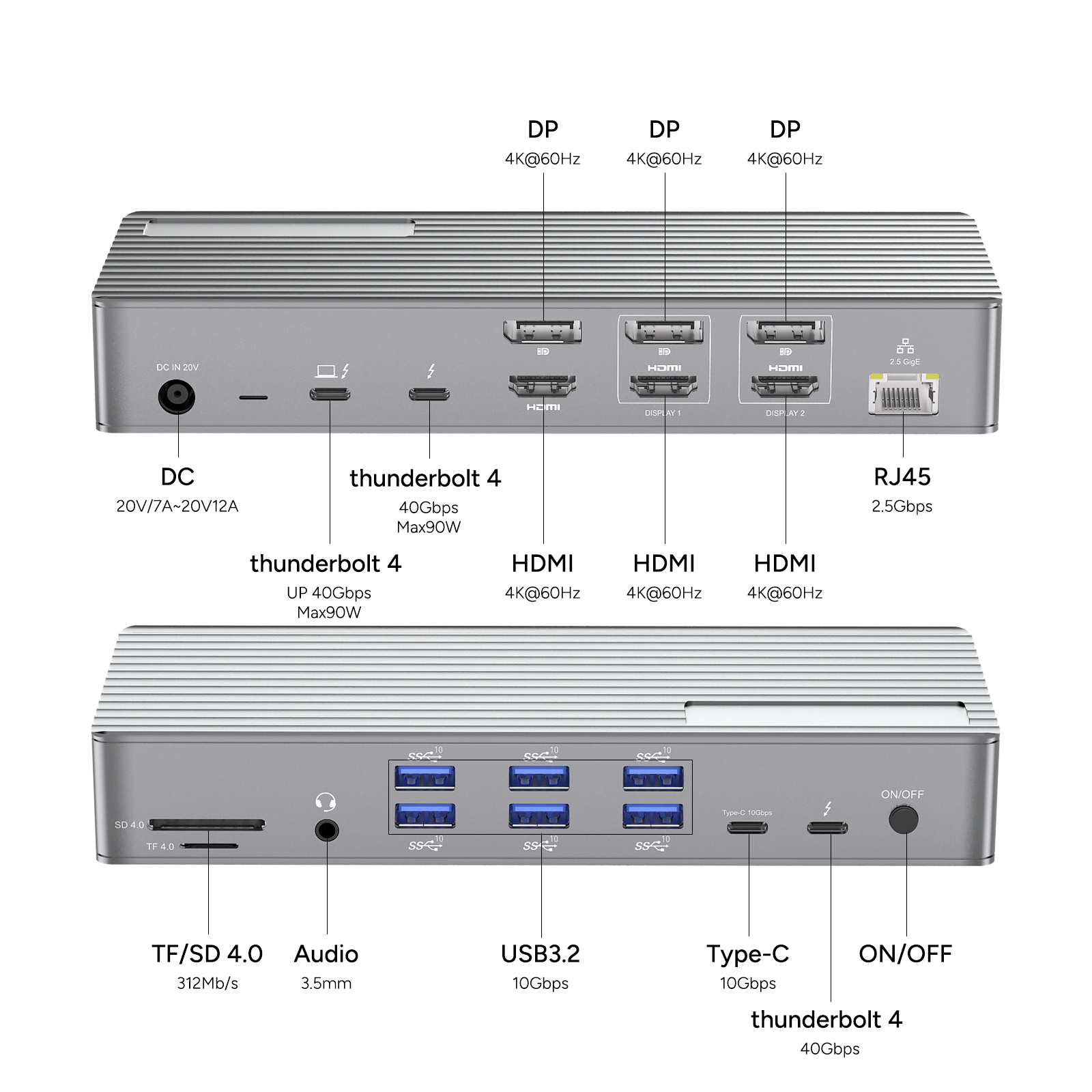
Through Thunderbolt 4 technology, users can achieve intelligent multi-device interconnection with a single cable, completely eliminating traditional cable clutter. This technology provides a 40Gbps ultra-fast channel, achieving a 4x efficiency improvement compared to USB 3.2 interfaces, compressing large file transfer times from minutes to seconds. In terms of display configuration, it supports dual 4K ultra-high-definition output or single 8K extreme-resolution display schemes, compatible with HDR10+/Dolby Vision certified displays, meeting the visual demands of professional design, film production, and other high-requirement scenarios.
II. Functional Architecture Upgrade: Intelligent Hub for All-Scenario Adaptation
The power supply system adopts 100W PD pass-through charging technology, perfectly adapting to mobile office scenarios. A single cable simultaneously completes data transmission and device power supply, enabling devices such as laptops, tablets, and smartphones to operate while charging, eliminating range anxiety. In topological structure, it employs a hybrid star-chain topology design, supporting daisy-chain topology connections that can connect up to 6 peripheral devices. Through PCIe direct-connect channels, it enables direct access to high-performance devices such as external GPUs and high-speed storage, constructing a high-efficiency expansion system.
III. Common Issues
Compatibility Solutions
Thunderbolt 4 docks offer broad device compatibility, seamlessly integrating with Thunderbolt 4/3-equipped laptops and new desktops across brands, including MacBook Pro/MacBook Air series (requiring corresponding interfaces), Windows high-performance laptops, and select new desktop devices. For legacy Thunderbolt 2 devices, users can utilize Apple's Thunderbolt 3 to Thunderbolt 2 adapter for interface transition, preserving original device functionality while expanding connectivity dimensions.
Connection Configuration Guide
Device connection follows a standardized five-step process:
1.Confirm the host is equipped with Thunderbolt 4/3 physical interfaces;
2.Use a dedicated Thunderbolt cable for direct connection between host and dock;
3.Connect displays, USB peripherals, audio modules, etc., to corresponding dock ports;
4.Power on the dock's power system;
5.The system automatically completes device recognition and configuration without manual intervention.
Key Considerations:
Regularly update dock and host firmware/drivers to ensure optimal compatibility;
Evaluate total peripheral power requirements in advance to match dock power capabilities;
Strictly follow manufacturer-specific operation manuals and technical support guidelines.
High-Frequency Issue Solutions
Display Expansion: Connect displays via dock's HDMI/DP ports and configure multi-screen setups in system display settings;
Audio Output: After connecting audio devices to dedicated ports, select the dock as the output source in system audio settings;
USB Expansion: External storage and input devices connect via USB ports for plug-and-play functionality;
Troubleshooting: Standard measures include reinserting devices, system restarts, driver updates; persistent issues require contacting manufacturer technical support.
Performance Core Advantages
The dock supports dual-mode high-speed transmission—data channels achieve 40Gbps peak bandwidth for high-load demands like 4K/8K video streams and large file transfers, while power channels support PD 100W fast-charging protocols for simultaneous data transmission and device charging. This dual-channel parallel design enables users to maintain efficiency during multitasking, freeing them from cable constraints and range anxiety to truly achieve a "one-cable-connects-all" intelligent ecosystem experience.
IV. Conclusion
Thunderbolt 4 docks reshape 3C device usage experiences through high-efficiency performance, integrating multiple advantages. Its core highlights include versatile connectivity—simultaneously connecting external hard drives, displays, etc., to construct all-in-one workstations; 40Gbps ultra-fast transmission ensuring smooth 4K video playback and large file transfers for high-intensity data processing; multi-display support via HDMI/DP interfaces for dual/triple screen collaboration to enhance multitasking efficiency; and 100W PD fast charging that replenishes devices during data transmission to solve range pain points.
When selecting, users should clarify their needs: for multi-screen collaboration, prioritize video interface configurations; for high-speed transmission, confirm interface bandwidth compliance; for mobile office scenarios, portability and fast-charging efficiency are critical. Precisely matching needs maximizes device potential, achieving comprehensive upgrades in efficiency, convenience, and connection stability.
In summary, Thunderbolt 4 docks redefine intelligent workstation standards through "connection-transmission-power supply" triple optimization, enabling 3C device experiences to be more efficient and free.










