Connecting a wireless receiver (RF Dongle) to a USB Hub or Docking Station is a standard cable management strategy for maintaining a clean desktop. However, this seemingly logical setup often leads to a frustrating user experience: as soon as an external drive begins high-speed data transmission, the wireless pointing device suffers from cursor drift, input lag, or complete disconnection.
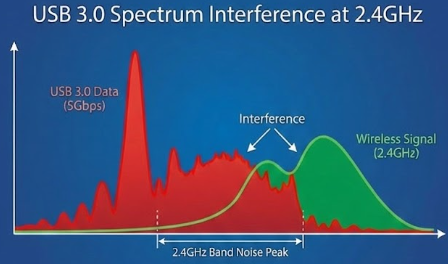
This phenomenon is rarely a defect in the peripheral hardware. Instead, it is a classic electromagnetic compatibility (EMC) conflict. For OEM/ODM buyers and procurement managers, understanding this mechanism is critical for selecting high-quality USB-C docking stations.
The Failure Mechanism: Spectrum Noise at 5Gbps
When troubleshooting connectivity drops, users often cycle through replacing batteries or reinstalling drivers without success. The root cause lies in the physical signaling characteristics of the USB 3.0 (and higher) protocol.
When a USB-C Hub transmits data at 5Gbps or faster, the high-speed differential signaling generates broadband electromagnetic noise. According to technical validation by Intel, the spread-spectrum clocking used in USB 3.0 produces noise harmonics that peak specifically within the 2.4GHz to 2.5GHz frequency band.
This frequency range directly overlaps with the operating band of most wireless receivers (including 2.4G dongles and Bluetooth adapters). When a receiver is placed in close physical proximity to an active USB 3.0 port without adequate isolation, the radiated noise from the docking station degrades the Signal-to-Noise Ratio (SNR) of the receiver. This results in the inability to resolve the wireless signal, manifesting as "freezing" or latency on the external device.
Engineering Solutions: The Manufacturer's Approach
As a source manufacturer, we address this physical limitation through a three-tier protection strategy in our USB Hub and Docking Station designs. This structural attention to detail distinguishes professional-grade equipment from budget alternatives.
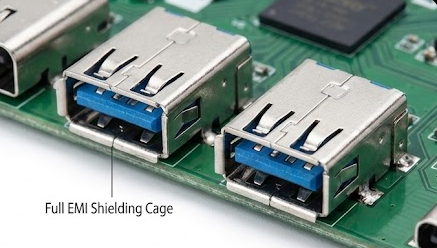
1. Comprehensive EMI Shielding Cages Low-cost hubs often leave connectors exposed on the PCB. Reliability-focused docking stations employ metal shielding cages over USB 3.0 ports and controller chips. We also implement full-surround grounding for the connector shells. This "Faraday cage" structure contains high-frequency noise internally, blocking radiation paths.
2. Dedicated USB 2.0 Channels Since USB 3.0 noise is inherent to the protocol, physical isolation is the most effective countermeasure. In our high-end desktop docking station PCB layouts, we route independent USB 2.0 data lines. Because USB 2.0 transmission frequencies (480Mbps) do not generate harmonics in the 2.4GHz band, using these dedicated ports for wireless receivers effectively bypasses the interference risk.
3. PCB Differential Signal Layout In multi-layer circuit board design, engineers must strictly control impedance matching for differential signal lines and maximize the ground plane area. We also increase the physical spacing between high-speed data traces and peripheral ports. While this manufacturing process increases costs, it significantly preserves signal integrity during heavy data transfer loads.
Recommendations for Procurement and Usage
For users experiencing this interference or B2B clients selecting products, we recommend the following protocols:
- Prioritize Metal Enclosures: Aluminum alloy bodies not only assist in heat dissipation but also act as a grounded barrier against RF interference.
- Identify Port Allocation: When using a USB-C Hub, connect wireless receivers to black USB 2.0 ports, reserving the blue USB 3.0/3.1 ports for high-speed storage devices.
- Distance via Extension: For compact USB Hubs, using a short USB 2.0 extension cable to move the receiver just 5-10cm away from the hub body can exponentially reduce signal attenuation.
Understanding the physics behind hardware interactions prevents unnecessary RMA (Return Merchandise Authorization) requests. When evaluating OEM partners, verifying their EMI testing standards and shielding craftsmanship is essential for ensuring a stable end-user experience.









