As mobile work and multi-device collaboration demands surge, docking stations have emerged as a core peripheral to enhance device connectivity. Unlike simple splitters that only divide interfaces, docking stations utilize built-in independent processing chips for hardware protocol conversion, supporting simultaneous video output, high-speed data transmission, network access, charging, and other functions—earning them the title of "universal interface hub" for laptops, servers, and workstations.
Core Value & Working Principles of Docking StationsA docking station connects to a host device via a single interface (e.g., USB-C or Thunderbolt), expanding into multiple interface types such as HDMI, DP, USB-A, Ethernet, and SD card slots. Its operation relies on hardware-level protocol conversion—internal chips adapt host signals to different interface standards, ensuring lossless data transmission. For instance, Thunderbolt 3/4-compatible docking stations deliver 40Gbps bandwidth, enabling three 4K@60Hz displays or one 8K display while supporting Power Delivery (PD) fast charging. This design resolves the interface shortage pain point of ultrabooks, enabling a "one-dock-connects-all" convenience.
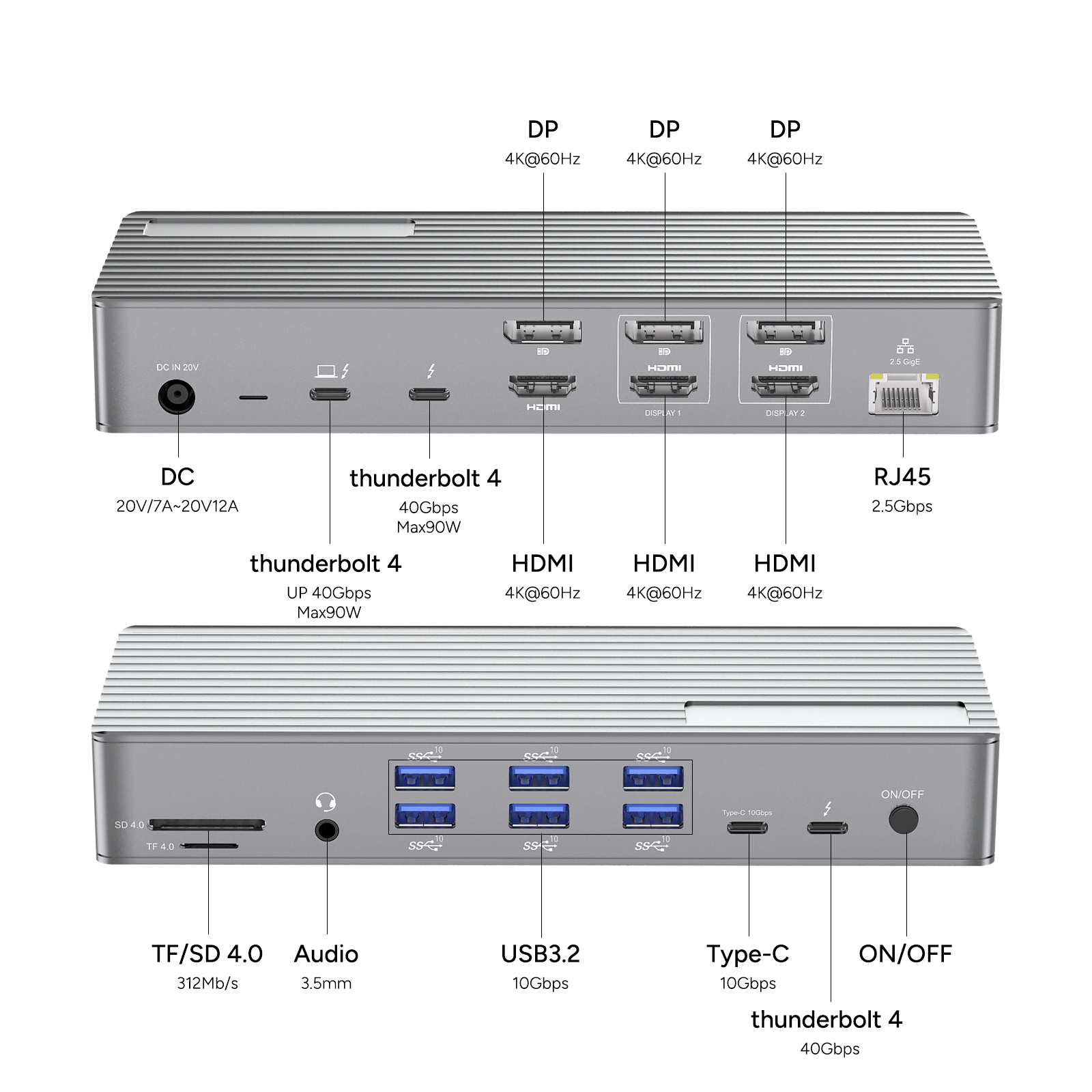
PURPLELEC DS020
As a benchmark 20-in-1 Thunderbolt 3 docking station, the DS020 integrates eight core advantages:
-
Ultra-Fast Transmission: Supports 40Gbps Thunderbolt 3 interface, compatible with USB4/3.2/3.1 protocols; USB-A 3.2 Gen2 ports achieve 10Gbps data speeds, while TF/SD card slots reach 312MB/s read/write speeds.
-
Multi-Display Output: Equipped with three HDMI and three DP ports, enabling single 8K@30Hz, dual 4K@60Hz, or triple 4K@30Hz video output for scenarios like professional design or financial monitoring.
-
Versatile Network & Audio: Integrated 2.5G Ethernet port (backward compatible with Gigabit/100M) and 3.5mm audio interface, supporting high-definition audio I/O and direct microphone connections.
-
Robust Power Delivery: PD 85W host charging + 15W device charging, compatible with mainstream laptop fast-charging protocols to eliminate external power clutter.
-
Extensive Connectivity: Eight USB-A 3.2 Gen2 ports, one Type-C port, and a card reader allow simultaneous connection of keyboards, mice, external drives, cameras, and more.
-
Industrial-Grade Cooling: Full-aluminum chassis with efficient heat dissipation structure ensures stability during prolonged high-load operation.
-
Cross-Platform Compatibility: Supports Windows, macOS, Linux, Android, and works with Lenovo, Dell, Huawei, and other brand laptops/servers.
-
Portable Design: Compact body with cable management groove balances desktop tidiness and mobile work needs.
Use Cases & Buying Advice for Docking Stations
For moderate-to-heavy computer users (e.g., programmers, designers, video creators), docking stations are essential productivity tools. Take the DS020: its multi-screen capability allows simultaneous coding and document viewing, high-speed ports enable rapid large-file backups, and PD charging ensures uninterrupted mobile work. When selecting, prioritize interface types/quantities matching your needs—e.g., HDMI/DP bandwidth for video editing, USB 3.2/Thunderbolt for data transfer.
Compared to USB extenders, docking stations achieve signal integrity via chip-level protocol conversion, avoiding signal degradation from long-distance cabling. Their plug-and-play support and superior compatibility make them the top choice for remote/hybrid work scenarios.
Conclusion
Docking stations redefine device connectivity standards through hardware protocol conversion and multi-interface integration. Choosing a professional solution like PURPLELEC DS020 not only resolves interface shortages but also elevates efficiency via high-speed transmission, multi-display expansion, and stable power delivery. In an era where mobile work and multi-device collaboration are the norm, a high-performance docking station has become an indispensable "must-have" for modern digital life.









